How do I redirect a group of old addresses (URL wildcards)?
A wildcard sends every address that matches a pattern to another one, for example all of old-blog/... to blog/...
after a move or a relaunch.
Who can do this
Users whose role has content/urltranslator.
Steps
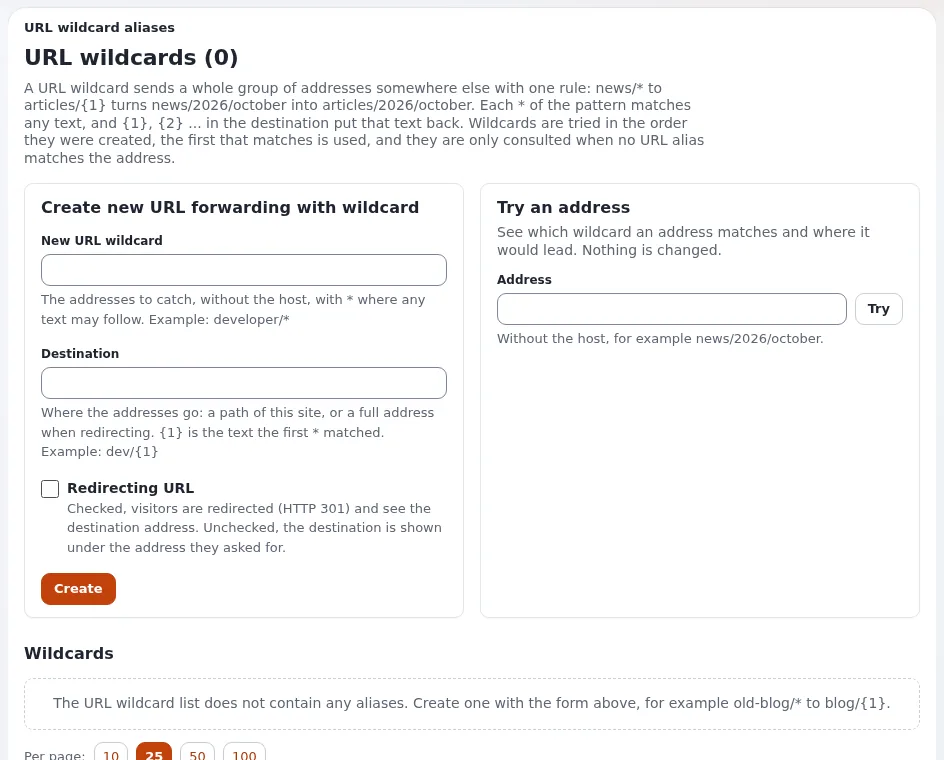
- Open Setup > URL wildcards.
- Under Create new URL forwarding with wildcard, enter the pattern, for example
old-blog/*. - Enter the destination.
{1}stands for what the*matched, for exampleblog/{1}. It can also be an address on another site. - Choose Redirecting (visitors and search engines see the new address) or Direct (the page is shown at the old address).
- Click Create.
- Under Try an address, enter an old address and click Try: the page says what it Becomes.
What can go wrong
- Addresses loop or go to the wrong page. A destination that matches another wildcard causes a loop. Try the address first, and keep patterns specific.
- The wildcard has no effect. A real page or alias with that address comes first. Wildcards only catch addresses that do not exist.
Related pages
- How do I give a page an extra address?
- Migrating URLs: many old addresses at once, from a file
- URL wildcards
- Redirects and moved content
- User manual
Become an Exponential Partner
Partners share their information, provide funding, contribute back and develop the products with us, and that is how Exponential grows. A partner website and dashboard are planned for mid-2027: please become a partner today to speed up our growth rate and land new features faster.