How do I see the active extensions and the system information?
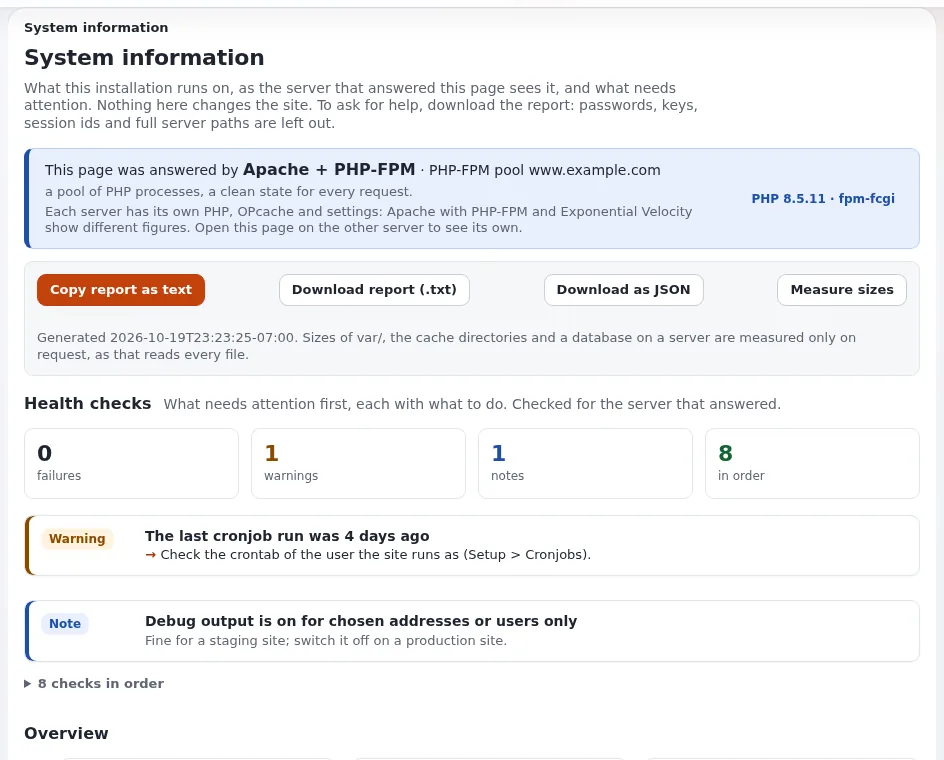
Two pages answer "what is installed and how is it running": Extensions and System information. Support asks for them first.
Who can do this
Extensions needs setup/setup; activating or deactivating also needs it. System information needs
setup/system_info.
Steps
- Open Setup > Extensions. The Overview counts active and inactive extensions; All extensions lists each with its version, license and whether it is a git checkout.
- Use Find extensions to search by name, description or license, or show only Active or Inactive ones. Click an extension's name for its Details.
- Open Setup > System information. Health checks come first, then Overview, and sections for Active extensions, PHP extensions and settings, Siteaccesses, Database connection and more.
- For support, open Report for support and click Copy report as text or Download report (.txt).
What can go wrong
- Attention: deactivating an extension can break the site. Pages and content that need it stop working. Change extensions only after reading the warnings, and on a test copy first.
- A health check is red. Each check says what is wrong and what to do; pass it on to the person who runs the server.
- The report contains server details. Send it only to your support partner, not in public.
Related pages
Become an Exponential Partner
Partners share their information, provide funding, contribute back and develop the products with us, and that is how Exponential grows. A partner website and dashboard are planned for mid-2027: please become a partner today to speed up our growth rate and land new features faster.