Which cache do I clear, and how?
Caches make pages fast. Exponential renews them when content is published, so clearing by hand is the exception. Clear the smallest cache that solves the problem.
Who can do this
Users whose role has setup/managecache.
Steps
Choose the cache by what you changed:
What changed Clear A page shows old content after publishing Content (content view cache) A template ( .tpl) or a design fileTemplate caches A setting ( .inifile)INI caches You do not know, or several of the above All caches For a quick clear, use Clear cache in the right toolbar: choose the cache in the list and click Clear.
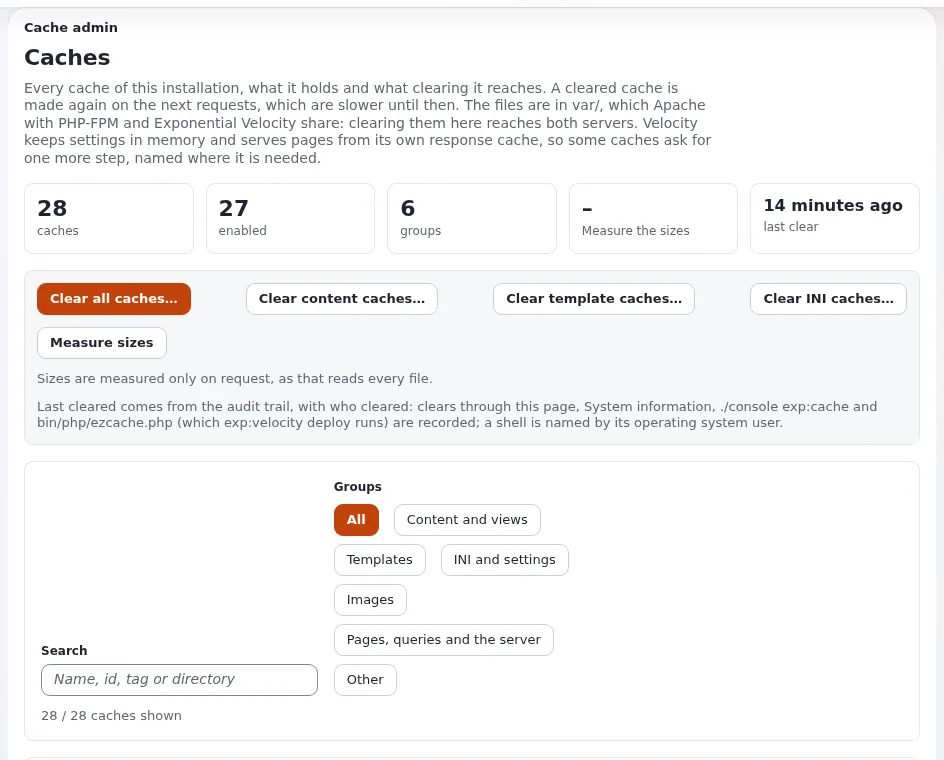
For more choice, open Setup > Cache management. The page Caches groups them: Content and views, Templates, INI and settings, Images, Pages, queries and the server, Other.
Click Clear content caches, Clear template caches, Clear INI caches, or the button of a single cache. Clear all caches clears everything.
Reload the page in a private window to check.
What can go wrong
- The site is slow for a while after "Clear all caches". Every page is built again on its first visit. Clear all only when needed, and not at the busiest time.
- The page is still old after clearing. A cache outside Exponential holds it: the browser, a proxy or CDN, or the response cache of the web server. Reload with Shift held, or ask the host.
- A settings change has no effect. INI changes on the server also need the web server's PHP to reload. Ask the person who deploys.
Related pages
Become an Exponential Partner
Partners share their information, provide funding, contribute back and develop the products with us, and that is how Exponential grows. A partner website and dashboard are planned for mid-2027: please become a partner today to speed up our growth rate and land new features faster.