How do I read the log files?
The log viewer shows the log files of the installation in the browser, so you can see what went wrong without access to the server.
Who can do this
Users whose role has setup/logs. Show unmasked (IP addresses and other personal data in clear) needs
setup/unmasklogs; Manage logs (rotate, remove) needs setup/managelogs.
Steps
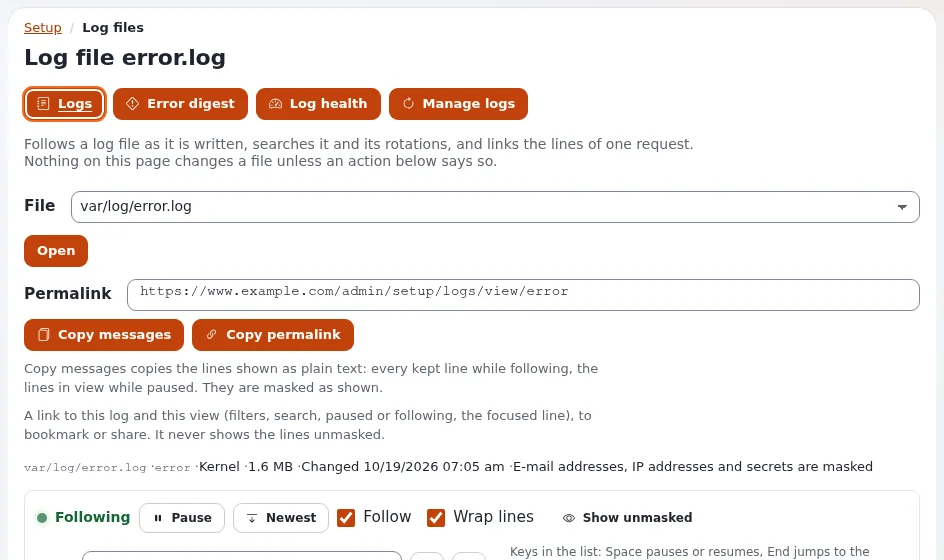
- Open Setup > Log files.
- Under File, choose the log, for example
var/log/error.log, and click Open. The newest lines are shown and new ones appear as they are written (Following). Pause stops the scrolling; Newest jumps back to the end. - Use the Controls to filter by level or search for a word, for example an error reference from an error page.
- Click a line to see the whole Entry. Copy permalink gives a link to that line for a colleague; Copy messages copies the lines.
- For an overview, click Error digest (the errors grouped by kind) or Log health (sizes and growth).
What can go wrong
- Addresses and names show as masked. That is the default to protect personal data. Ask for
setup/unmasklogsonly if you need it. - A log is empty. That kind of event has not happened, or logging for it is turned off.
- An error page shows a reference like
k1-.... Search for it in the log: see Finding an error by its reference.
Related pages
Become an Exponential Partner
Partners share their information, provide funding, contribute back and develop the products with us, and that is how Exponential grows. A partner website and dashboard are planned for mid-2027: please become a partner today to speed up our growth rate and land new features faster.