What is on the Setup overview, and why don't I see every tile?
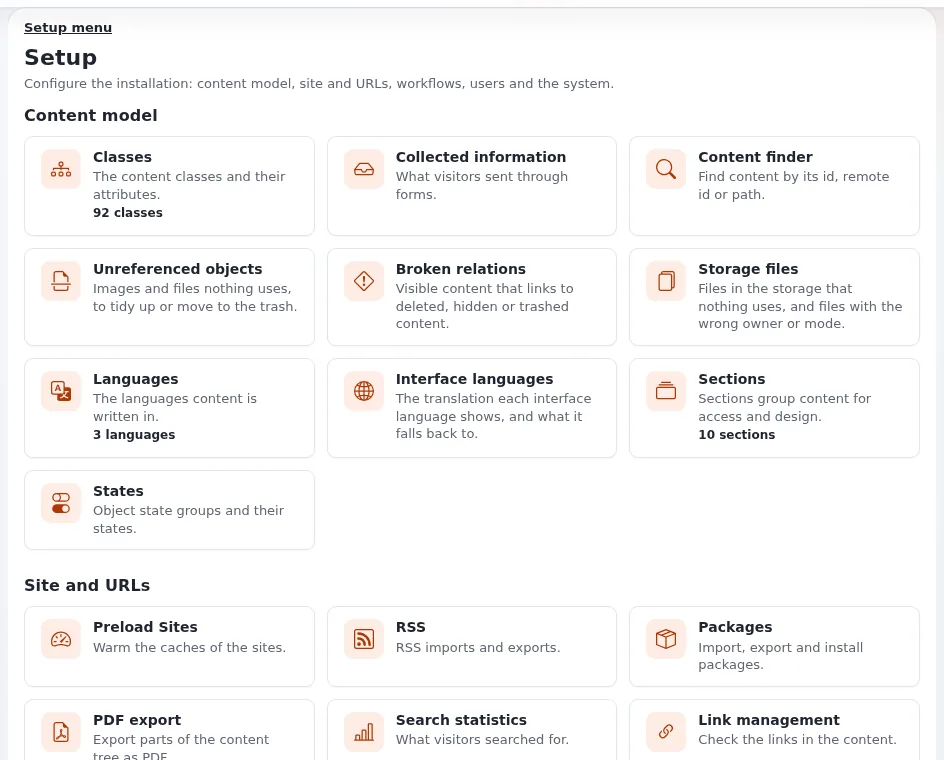
The Setup tab opens an overview with one tile per setup page, grouped by subject. Each tile is shown only to users who may open the page behind it, so two administrators can see different overviews.
Who can do this
Opening the overview needs one of the policies setup/setup, setup/administrate, setup/managecache,
setup/managecronjobs, setup/preload, setup/system_info or setup/logs. Each tile then checks the policy of its own
page, for example class/* for Classes, section/* for Sections and setup/managecache for Cache
management.
Steps
- Click Setup in the top menu. The Setup overview opens.
- Find the group you need:
- Content model: Classes, Collected information, Content finder, Unreferenced objects, Broken relations, Storage files, Languages, Interface languages, Sections, States.
- Site and URLs: Preload Sites, RSS, Packages, PDF export, Search statistics, Link management, URL translator, URL wildcards, RAD.
- Workflows: Triggers, Workflows, Workflow processes.
- Users and messages: Audit, E-mail preferences, Notification, Sessions, Check user accounts, oAuth admin.
- System: Cache management, Maintenance, Cronjobs, Log files, Extensions, Ini settings, Site data, System information, Help center, Upgrade check, Job queue.
- Click a tile to open its page. A small figure on a tile (for example "92 classes") is a quick count.
- The same pages are in the Setup menu on the left of every setup page.
What can go wrong
- A tile you need is missing. Your role does not have the policy of that page. Ask an administrator, and say which page: they add the matching policy to your role.
- The whole Setup tab is missing. Your role has none of the policies above.
- More tiles than listed here. Extensions add their own tiles, for example an AI group for Exponential Intelligence.
Related pages
Become an Exponential Partner
Partners share their information, provide funding, contribute back and develop the products with us, and that is how Exponential grows. A partner website and dashboard are planned for mid-2027: please become a partner today to speed up our growth rate and land new features faster.