How do I empty the trash or remove single items from it?
Removed objects go to the trash first. From there you can put them back, or delete them for good.
Who can do this
Every user sees the items they may read. Removing for good needs content/cleantrash; restoring needs
content/restore. Administrators have both.
Steps
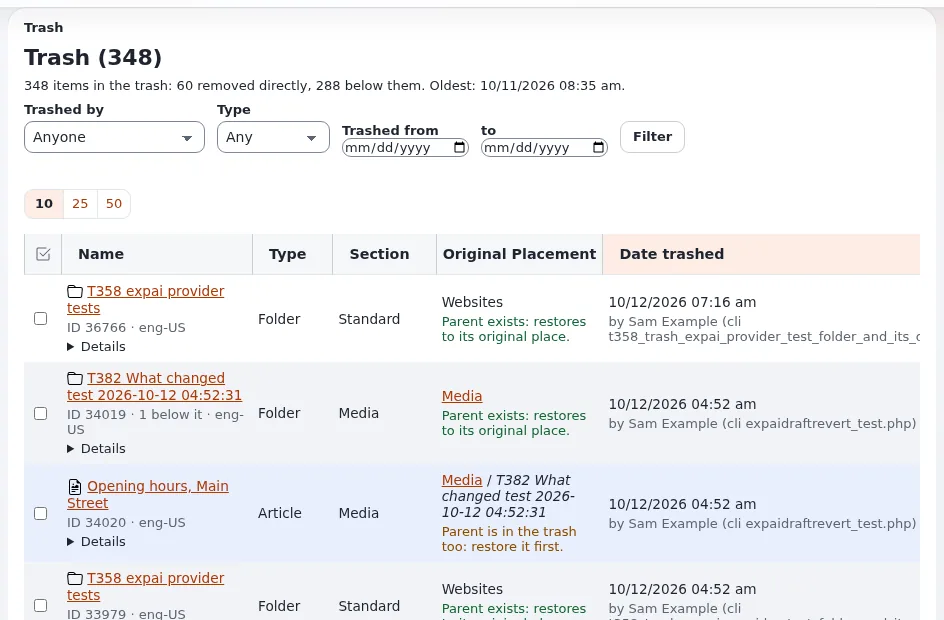
- Click Trash at the bottom of the left column (in Content structure or Media). The page Trash opens with the number of items. Each row shows who trashed it, when, and where it was.
- Narrow the list with the filter and click Filter.
- To put an item back, click Restore in its row and choose where it goes.
- To delete some items for good, tick them and click Remove selected. Confirm.
- To delete everything, click Empty trash and confirm.
What can go wrong
- Attention: removing from the trash cannot be undone. The object, its versions and its files are deleted. Check the list before you confirm.
- Restore asks for a place. The old place no longer exists. Choose another one.
- Links to the item break. Other content that links to it shows a broken link. The content check lists them: see What does the content check find?
Related pages
- The trash shows who trashed an item and where it was
- Archiving and the trash
- Removing and hiding: the check of reverse relations
- User manual
Become an Exponential Partner
Partners share their information, provide funding, contribute back and develop the products with us, and that is how Exponential grows. A partner website and dashboard are planned for mid-2027: please become a partner today to speed up our growth rate and land new features faster.