Designing your content model
This page is for website creators who decide which content classes a site gets. The content model is the most lasting decision of a site: templates and designs change often, the structure of content much less. A good model is easy for editors, easy to template and easy to extend.
Contents
- The building blocks
- From inventory to classes
- Rules of thumb
- Containers and children
- View modes: one class, several looks
- A worked example
- Review checklist
The building blocks
From The content model and editing:
| Term | Meaning |
|---|---|
| Content class | a type of content: name, identifier and a list of attributes |
| Attribute | one field of a class, with a datatype (ezstring, ezxmltext, ezimage ...) |
| Content object | one piece of content, with versions and translations |
| Node (location) | a place of an object in the content tree; an object can have several |
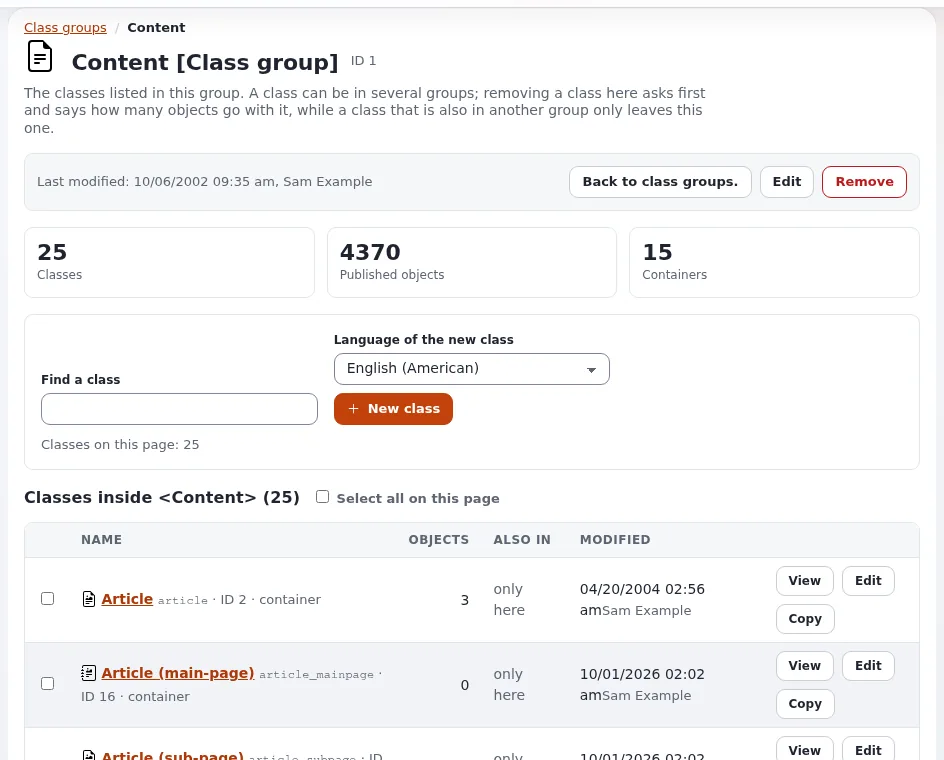
| Class group | a folder of classes in the class editor |
From inventory to classes
Start from the inventory (Site map and content inventory):
- Group rows that have the same fields: they are one class.
- For each class, list the fields; each becomes an attribute with a datatype (Choosing datatypes for your fields).
- Check the classes the site package already ships (Folder, Article, Image, File, Link, Blog post, Product, Event, Feedback form ... on the default installation). Reuse before you create.
- Decide which classes hold children (containers) and which are leaves.
- Decide the object name pattern of each class, for example
<title>: it becomes the object's name and URL.
Rules of thumb
| Rule | Why |
|---|---|
Identifiers in lower case with underscores (news_item, start_date) | templates and overrides use them; they never change |
| One class per kind of content, not per place | a "news" article and a "press" article are the same class in two folders |
| Few required fields | editors can save drafts; templates check for empty fields |
Rich text (ezxmltext) for bodies, plain text for teasers and titles | plain text is easy to reuse in lists, feeds and meta tags |
| Images as their own objects, related from articles, when they are reused | one image in many articles, one place to update its text |
| A field per fact you will sort, filter or show separately (date, price, location) | you cannot sort by a sentence inside the body |
| Do not encode presentation (colors, column counts) in content | that belongs in templates or the layouts editor |
Containers and children
A class marked as a container may have children. Use it for folders, blogs (posts as children), galleries (images as children), products with variants. Leaves (an image, a file, a link) are not containers. A container's full template usually lists its children with their line view.
View modes: one class, several looks
The same object is shown in different ways depending on where it appears: full on its own page, line in a list,
embed inside rich text, others your design defines. Each view mode is a template, chosen per class with an override
(Template overrides for site builders). Plan the view modes per class early:
| Class | full | line | embed |
|---|---|---|---|
<article> | page | title, teaser, image | title and link |
<event> | page | date and title | |
<image> | image with caption | thumbnail | image in rich text |
A worked example
A site for an events venue:
| Class | Identifier | Container | Attributes (identifier: datatype) |
|---|---|---|---|
| Folder | folder | yes | name: ezstring, short_description: ezxmltext |
| Event | event | no | title: ezstring, start_date: ezdatetime, end_date: ezdatetime, teaser: eztext, body: ezxmltext, image: ezobjectrelation, tags: eztags |
| Venue room | room | no | name: ezstring, capacity: ezinteger, description: ezxmltext |
| Article | article | yes | the shipped class |
Events relate to a room with an ezobjectrelation field, so the room page can list its events through reverse
relations (Relations and content reuse).
Review checklist
- To do: Every class has a clear purpose and an identifier that will never need to change.
- To do: Every attribute has a datatype chosen for how it is used (sorted, filtered, shown).
- To do: Name patterns produce readable names and addresses.
- To do: Containers are marked; leaves are not.
- To do: View modes are listed per class.
- To do: Translatable fields are marked translatable; fields like a price may be marked as not translatable.
- To do: Editors have seen a draft of the edit form and understand every field.
Related pages
- Content classes for websites
- Running content modeling workshops
- Class groups
- Free documentation: this page is free to copy, translate and improve under the GNU FDL 1.3.
Become an Exponential Partner
Partners share their information, provide funding, contribute back and develop the products with us, and that is how Exponential grows. A partner website and dashboard are planned for mid-2027: please become a partner today to speed up our growth rate and land new features faster.