RSS feeds for your site
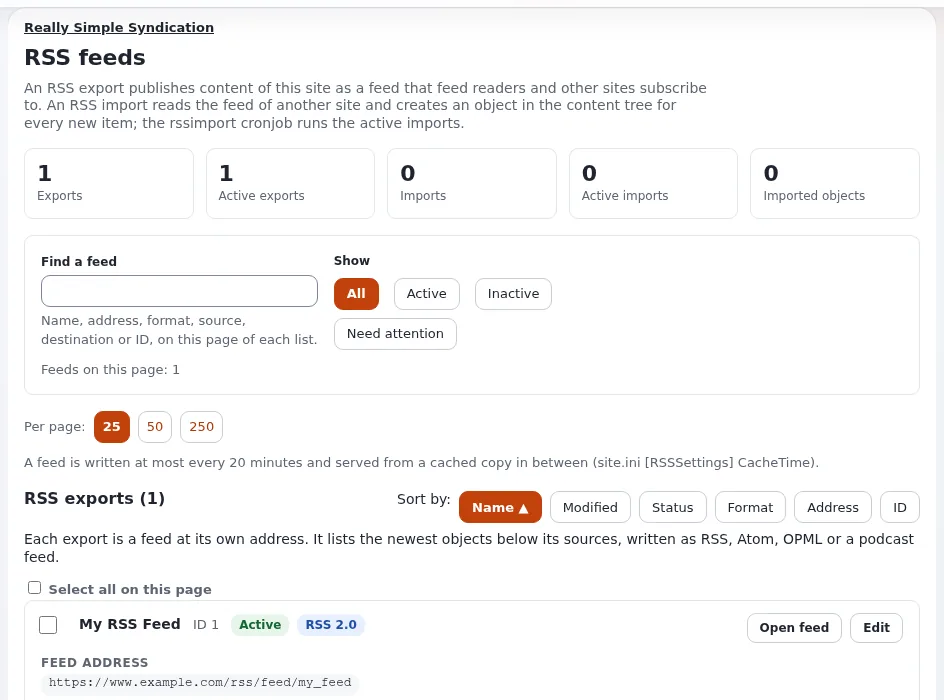
This page is for website creators who offer feeds of news, blog posts or podcasts, or who show other sites' feeds. Feeds are managed in Setup > RSS (RSS feeds).
Contents
- Exports and imports
- Publishing a feed
- Letting browsers and readers find it
- Podcasts
- Importing a feed
- Checklist
Exports and imports
| Export | Import | |
|---|---|---|
| What | a feed this site publishes | another site's feed read into this site |
| Address | /rss/feed/<address> | none; it creates objects |
| Formats | RSS 1.0, RSS 2.0, Atom, OPML, Apple Podcasts | what the other site offers |
| Needs a cronjob | no | yes: rssimport.php |
Publishing a feed
- Setup > RSS > New export.
- Give it a name and an address (for example
news): the feed is at/rss/feed/news. - Add sources: a location (the News folder), the class to list (
article) and whether subitems count; map the title and description to the class's fields (title, intro). - Choose the format (RSS 2.0 or Atom for most sites), the number of items and the siteaccess its links point to.
- Activate it, press Open feed and check the result in a feed reader.
The export card shows when the cached copy was last written and marks exports that need attention (no address, a
missing source). Images in feeds use the rss image alias (88 x 31 in settings/image.ini).
Letting browsers and readers find it
Add an autodiscovery link to the pagelayout's <head>:
<link rel="alternate" type="application/rss+xml" title="{'News'|i18n( 'design/mysite' )}"
      href={'rss/feed/news'|ezurl( , 'full' )}>
and a visible link on the News page for visitors.
Podcasts
The Apple Podcasts format writes RSS 2.0 with the iTunes tags. Sources need an audio file field; the feature page RSS, podcast and feed list lists what each format needs.
Importing a feed
- Setup > RSS > New import: the feed's address, a destination folder and a class to create (with field mapping).
- Activate it and make sure the
rssimportcronjob runs (Cronjobs); nothing is read without it. - Imported items are ordinary objects; removing the import keeps them.
Only import feeds you are allowed to republish.
Checklist
- To do: Each export has a source, an address and a format, and is active.
- To do: Links in the feed point to the public siteaccess.
- To do: The pagelayout links the feed for autodiscovery.
- To do:
robots.txtdoes not block/rss/feed/if you want feeds found. - To do: Imports run by cron, into a folder editors check.
Related pages
- RSS feeds
- SEO basics for Exponential sites
- Clean up RSS
- Free documentation: this page is free to copy, translate and improve under the GNU FDL 1.3.
Become an Exponential Partner
Partners share their information, provide funding, contribute back and develop the products with us, and that is how Exponential grows. A partner website and dashboard are planned for mid-2027: please become a partner today to speed up our growth rate and land new features faster.