Relations and content reuse
This page is for website creators who want one piece of content in several places: an image in many articles, an author box on every post, a product shown with its accessories. Exponential reuses content by relations rather than copies, so a change is made once.
Contents
- Three ways to reuse
- Relation fields
- Embedding in rich text
- Showing relations in templates
- Reverse relations
- Removing related content safely
Three ways to reuse
| Way | Use when | Result |
|---|---|---|
A relation field (ezobjectrelation, ezobjectrelationlist) | the relation is part of the content model ("author", "related articles", "venue") | a typed field editors fill with a picker |
| An embed in rich text | an editor wants an image or box inside a text | the object is shown at that place in the body |
| Several locations | the item belongs in two places of the menu | the same object at two addresses |
Relation fields
Add an attribute of datatype Object relations (ezobjectrelationlist) or Object relation (ezobjectrelation)
to the class. In its options you can limit the classes that may be chosen (for example only image), choose where the
picker starts browsing, and whether editors may create a new object from the field. Editors then pick objects in the
edit form (Editing content).
Embedding in rich text
In a rich text field the online editor inserts objects (images, files, other content) as embeds. The object is
rendered with its embed view mode, which your design can override per class
(Template overrides for site builders). Embeds create relations too, so the reverse
relations below include them.
Showing relations in templates
A relation field renders with its datatype template:
{attribute_view_gui attribute=$node.data_map.related_articles}For your own markup, loop over the related objects. ezobjectrelationlist stores a list of object IDs in
.content.relation_list:
{if $node.data_map.related_articles.has_content}
<ul>
  {foreach $node.data_map.related_articles.content.relation_list as $relation}
    {def $related = fetch( 'content', 'object', hash( 'object_id', $relation.contentobject_id ) )}
    <li><a href={$related.main_node.url_alias|ezurl}>{$related.name|wash}</a></li>
    {undef $related}
  {/foreach}
</ul>
{/if}
Or fetch all objects the current object relates to, through one field or all relations
(fetch( 'content', 'related_objects', ... ), defined in kernel/content/function_definition.php with the parameters
object_id, attribute_identifier, all_relations, sort_by, limit, offset and more):
{def $related = fetch( 'content', 'related_objects', hash(
    'object_id', $node.contentobject_id,
    'all_relations', true(),
    'limit', 5 ) )}
Reverse relations
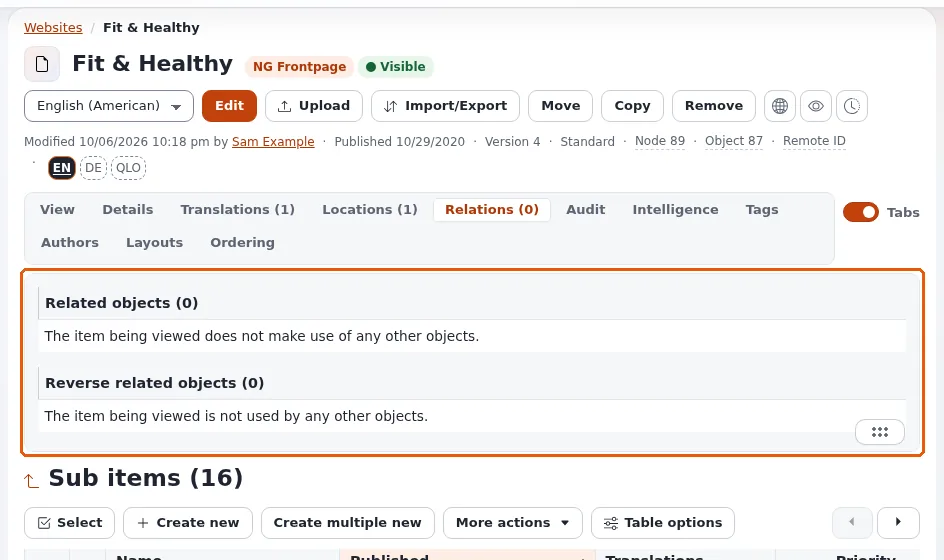
The other direction, "everything that points to this object", answers questions such as "which events take place in this room" or "which articles use this image":
{def $events = fetch( 'content', 'reverse_related_objects', hash(
    'object_id', $node.contentobject_id,
    'all_relations', true(),
    'sort_by', array( 'published', false() ) ) )}
{foreach $events as $event}
  {node_view_gui content_node=$event.main_node view='line'}
{/foreach}
{undef $events}
reverse_related_objects_count gives the number without loading the objects. Relation fetches return content the
visitor may read; ignore_visibility controls hidden content.
Removing related content safely
Before an object is removed or hidden, the administration checks reverse relations and warns when other content points to it (Reverse relation check). Check that list before you confirm: a removed image leaves a gap in every article that embedded it.
Related pages
- Designing your content model
- Choosing datatypes for your fields
- Fetch functions: reading data in templates
- Free documentation: this page is free to copy, translate and improve under the GNU FDL 1.3.
Become an Exponential Partner
Partners share their information, provide funding, contribute back and develop the products with us, and that is how Exponential grows. A partner website and dashboard are planned for mid-2027: please become a partner today to speed up our growth rate and land new features faster.