Running a shop: overview
This page is for website creators who sell on an Exponential site. The kernel includes a shop: products are content with a price field, visitors put them in a basket, check out, confirm, pay through a payment gateway, and orders are managed in the Store tab of the administration, which opens the Store dashboard (Store dashboard and order statuses).
Contents
The parts
| Part | Where |
|---|---|
| Products | content of a class with an ezprice or ezmultiprice field (the shipped product class) (Products, prices and VAT) |
| Basket | shop/basket (its view name is [BasketSettings] BasketViewName in shop.ini) |
| Checkout | shop/register (customer data), shop/confirmorder, shop/checkout |
| Payment | a workflow on the checkout trigger with a gateway event (Payment gateways) |
| Orders | shop/orderlist, shop/orderview, statuses, archive, customers, statistics |
| VAT | shop/vattype, shop/vatrules |
| Currencies | shop/currencylist, exchange rates ([ExchangeRatesSettings]) |
| Discounts | shop/discountgroup |
| Dashboard | shop/dashboard |
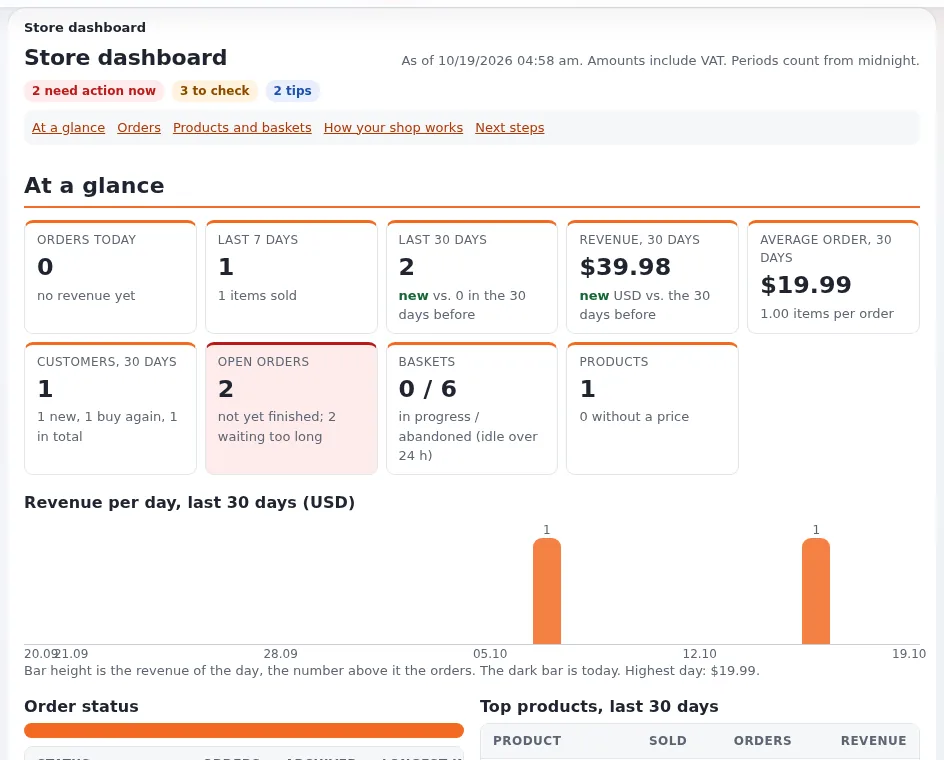
The shop's module and views are defined in kernel/shop/module.php; its settings in settings/shop.ini.
The visitor's path
- A product page has an Add to basket button (
shop/add). - The basket (
shop/basket) lists items, quantities and totals. - Checkout asks for the customer's data (
shop/register, orshop/userregister). - The confirmation page (
shop/confirmorder) shows shipping and VAT. - Payment: the checkout workflow sends the visitor to the gateway.
- The order is placed; a confirmation mail goes out and the visitor sees the order (or a permanent receipt, Order receipts).
Details: Basket, checkout and orders.
Setting up a shop, in order
- Product class with a price field; product folder; a few products.
- VAT types and, for several countries, VAT rules.
- Currency (
[CurrencySettings] PreferredCurrency) and rounding ([MathSettings]). - Templates: product full view with the add-to-basket form, basket, checkout pages (the ezwebin and simple themes ship them).
- Payment gateway and the checkout workflow.
- Shipping, when needed (a shipping handler or the simple shipping workflow in
workflow.ini). - Order confirmation mail and, if wanted, permanent receipts.
- A full test order, then the Store dashboard's "How your shop works" section to check the configuration.
Permissions
The shop module's functions are buy, administrate, setup, edit_status and setstatus. Visitors need
shop/buy; the shop staff need shop/administrate (orders, dashboard, statistics) and shop/setup for VAT and
currencies (Roles and policies).
What the shop does not do
Plan these as extensions or integrations: stock management, invoices in an accounting system, shipping labels, marketplaces. The Store dashboard's "Next steps" section suggests what is missing in your configuration.
Related pages
- Products, prices and VAT
- Basket, checkout and orders
- Payment gateways
- Shop basket view name
- Free documentation: this page is free to copy, translate and improve under the GNU FDL 1.3.
Become an Exponential Partner
Partners share their information, provide funding, contribute back and develop the products with us, and that is how Exponential grows. A partner website and dashboard are planned for mid-2027: please become a partner today to speed up our growth rate and land new features faster.