Landing pages with the layouts editor
This page is for website creators who build landing pages, campaign pages and front pages. The layouts editor (the
explayouts* extensions) arranges blocks in zones of a layout and maps the layout to pages with rules, all in the
browser. Editors use it day to day (The layouts editor); this page is the builder's view.
The complete reference is Exponential Layouts.
Contents
- The five ideas
- Where the editor is
- A campaign page from scratch
- Drafts and publishing
- When to use layouts and when templates
- Handing over to editors
The five ideas
From The five ideas you need:
| Idea | Meaning |
|---|---|
| Layout | a named arrangement based on a layout type, which fixes its zones; the type cannot be changed later |
| Zone | a named region of a layout (main, sidebar, footer); fill it, or link it to a shared layout |
| Block | one item in a zone: text, image, a list of articles, a hero; it has a definition, a view type and parameters |
| Collection | the content a listing block shows: manual (picked) or dynamic (a query) |
| Rule | decides which requests get which layout, by targets and conditions, highest priority first |
A rule decides that this request gets that layout; the layout's zones hold blocks; a block may own a collection that supplies its content.
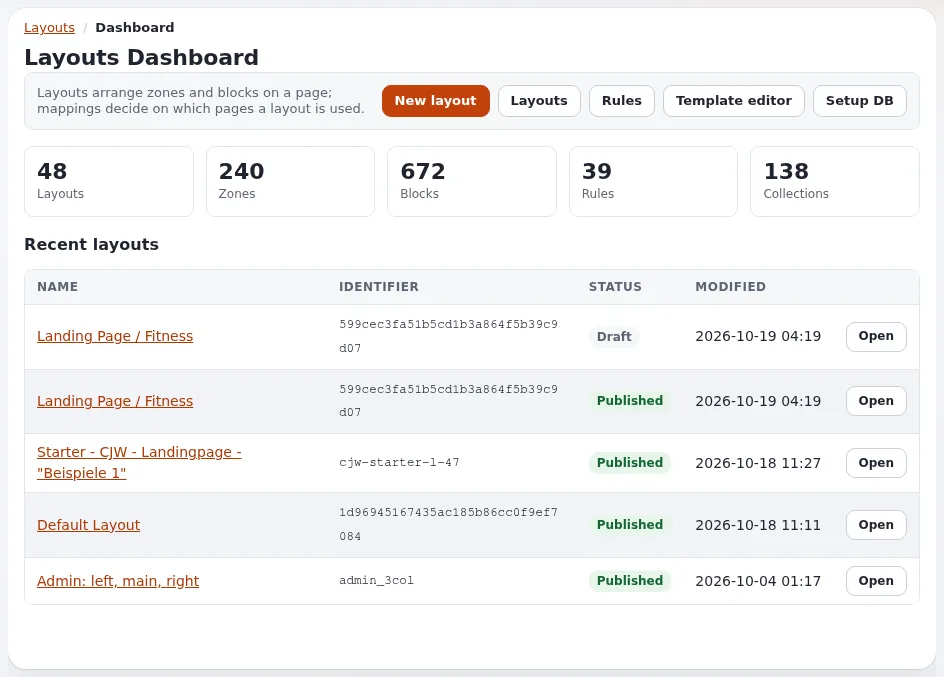
Where the editor is
- The editor:
/explayouts_ui_api/appin the administration. - The form-based screens (rules, shared layouts, import, setup):
/explayouts_ui/dashboard. - Permissions: the
explayoutsmodule's policies; at leastexplayouts/read(Permissions).
A campaign page from scratch
- Create the content page. Create a landing page object (for example of class Landing page) where the campaign
lives in the tree, say
/Autumn-campaign. - Create the layout. In the editor, Layouts > Create: layout type
hero(zonestop,left,main,right), identifierautumn_campaign, name "Autumn campaign". - Fill the zones.
top: aheroblock with title, text and a button.main: alistblock with view typegrid, a dynamic collection "children of the Products folder", limit 6.leftandright: arich_textblock each, or acard.
- Map it. In Mappings, a rule with target
node(the landing page) and, for a time-limited campaign, a conditiontimewithfromandto(Layout rules). - Preview, then Publish.
- Check the page on the site, logged out.
Drafts and publishing
The editor always works on a draft; visitors only see published layouts. Changes are saved to the draft continuously; Publish makes them live, Discard draft throws them away. Drafts are per layout, not per user: two people editing the same layout overwrite each other (Drafts, publishing and versions).
When to use layouts and when templates
| Use the layouts editor for | Use templates for |
|---|---|
| front pages, landing and campaign pages that change often | the full view of each class |
| arranging existing content into sections | markup every page shares (the pagelayout) |
| pages editors must change without a developer | logic: forms, shop steps, member pages |
| a shared header and footer |
A full_view block renders the current content item inside a layout, so a layout can frame normal content pages too.
A tpl_block renders a template a developer wrote, when no block type fits.
Handing over to editors
- To do: Give editors
explayoutspolicies, and only the layouts they own. - To do: Name every block clearly; note why an item is pinned in its name.
- To do: Show them The layouts editor help page and the tour in the admin tour.
- To do: Agree who publishes, and that one person edits a layout at a time.
Related pages
- Layout types, zones and blocks
- Layout rules: which page gets which layout
- Shared layouts: header, footer and prefooter
- explayouts_ui
- Free documentation: this page is free to copy, translate and improve under the GNU FDL 1.3.
Become an Exponential Partner
Partners share their information, provide funding, contribute back and develop the products with us, and that is how Exponential grows. A partner website and dashboard are planned for mid-2027: please become a partner today to speed up our growth rate and land new features faster.